See What Search EnginesReally See
Free Chrome extension for instant SEO audits and accessibility testing. Analyze meta tags, Open Graph, heading structure, and WCAG compliance in one click. No sign-up, no tracking, 100% private.

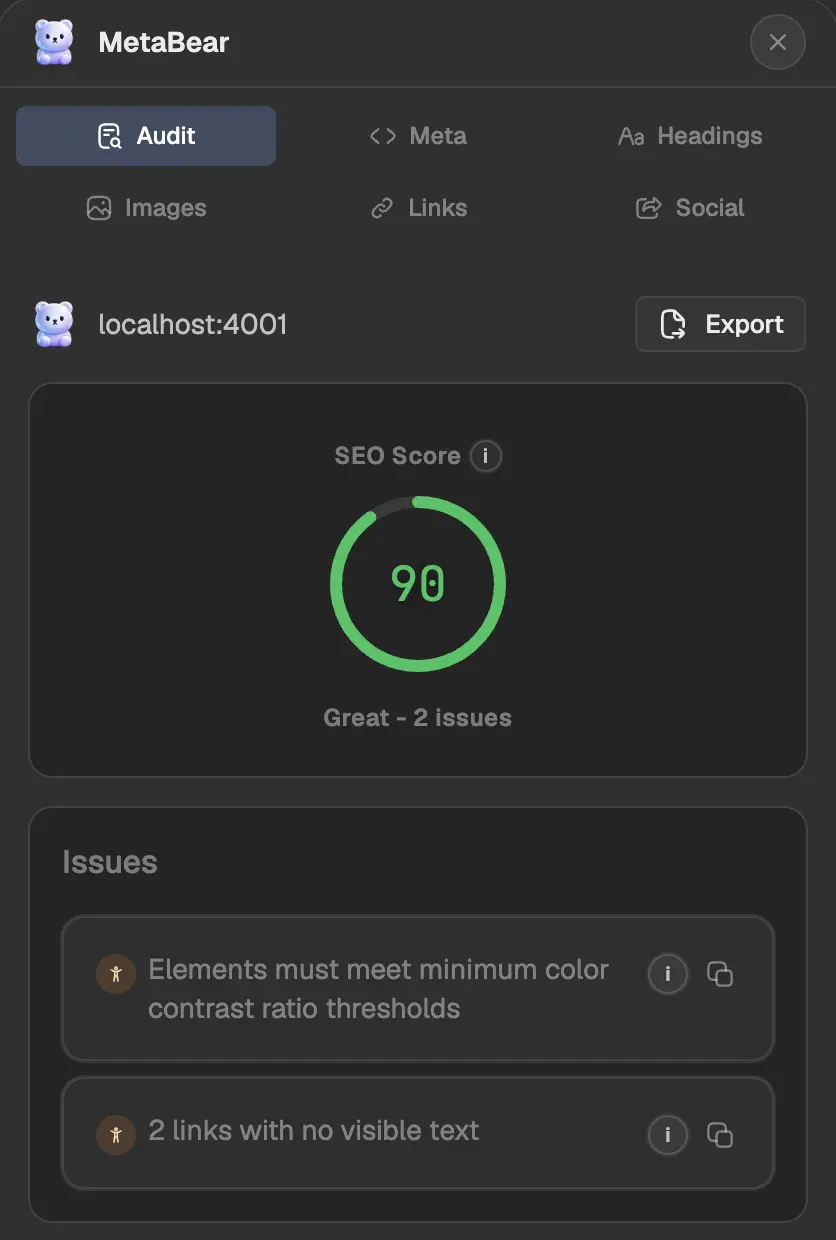
Complete SEO & Accessibility Tools
Six powerful panels for comprehensive website auditing. Test SEO, accessibility, meta tags, and social media previews instantly.
SEO Score & Audit
Get instant SEO score from 0-100 with categorized issues by severity. Identify title tags, meta descriptions, canonical URLs, and technical SEO problems instantly.
Meta Tags & Open Graph
Inspect HTML meta tags including title, description, canonical URL, robots directives, Open Graph tags, and Twitter Cards with character count validation.
Heading Structure Checker
Visualize H1-H6 heading hierarchy for SEO optimization. Detect skipped heading levels and validate semantic HTML structure for better search rankings.
Image SEO Analyzer
Find missing alt text, broken images, and large file sizes. Optimize images for search engines with detailed analysis of every image on your page.
Link Analysis Tool
Audit internal links, external links, nofollow attributes, and broken links. Analyze your link profile and detect redirect chains for better SEO.
Social Media Preview
Preview how your page appears on Google Search, Facebook, and Twitter. Test Open Graph images, Twitter Card meta tags, and social sharing optimization.
WCAG Accessibility Testing
Powered by axe-core for WCAG 2.1 compliance testing. Check color contrast, ARIA attributes, form labels, keyboard navigation, and screen reader compatibility.
Export Audit Results
Export complete SEO audit data as JSON for reporting. Copy issues as AI prompts for ChatGPT, Claude, or other LLMs to get instant fix recommendations.
Instant Browser Testing
100% client-side processing with zero external API calls. Fast, private SEO and accessibility testing directly in your Chrome browser without data collection.
How to Use MetaBear SEO Extension
Start auditing your website's SEO and accessibility in three simple steps
Install Chrome Extension
Add MetaBear SEO checker to Chrome from the Web Store. One-click installation with zero configuration required.
Click to Audit
Navigate to any webpage and click the MetaBear extension icon in your browser toolbar to start the SEO audit.
Fix SEO Issues
Review audit results, export issues as JSON or AI prompts, and fix them. Watch your SEO score improve instantly.
Start Your Free SEO Audit Today
Free, open source Chrome extension built for developers and SEO professionals
Add to ChromeFrequently Asked Questions
Everything you need to know about MetaBear